
“Your WhatsApp username is not your identity its your end-to-end security. Instead of sharing your phone number for formal and business contacts, you can now keep your personal number private and share your username instead.”
On 29 June, 2026 Meta announced a major privacy update. Now you can choose a special username for your WhatsApp account. Also you can sync username from Facebook and Instagram if you wish.
According to WhatsApp’s faq: If you don’t want to share your number with someone in order to chat on WhatsApp, you can give username instead.
Can You Change and Delete your Username?
Yes you can change and delete your username at any time. Because this is optional, you can use your WhatsApp without choosing a username, but keep in mind that once you change or delete a username it becomes available for others to claim.
if the username you want is already taken, you will need to choose a different one. Because certain usernames are held for business, governments, or public figures and can not be claimed by others.
How can you set a WhatsApp username?
How you can set a WhatsApp username on Android:
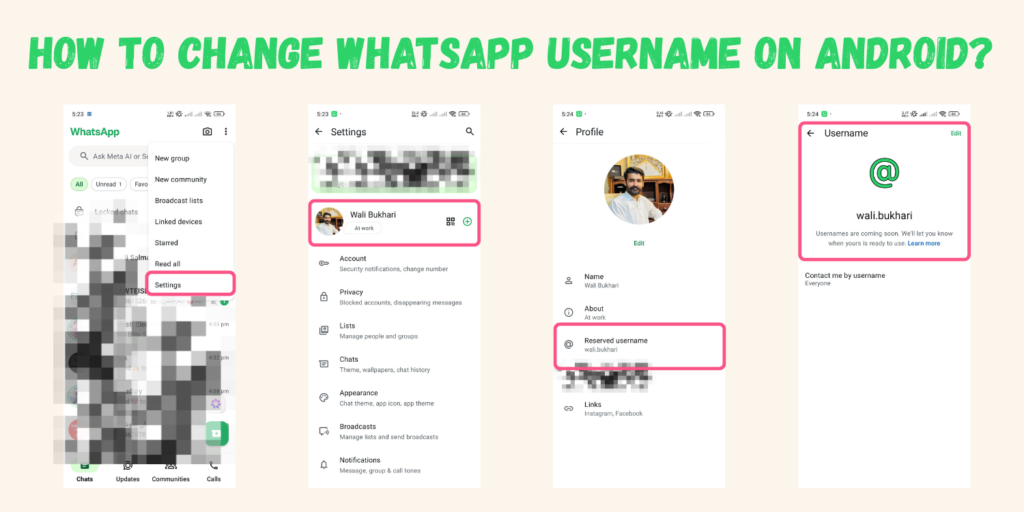
- Open your WhatsApp and click on three dots, then click on settings.
- Click on your profile picture then scroll down, you will see the username option.
- Click on username option and it will take you on the username reservation page.
- Select your unique username and reserve it.
How you change WhatsApp username on IOS:
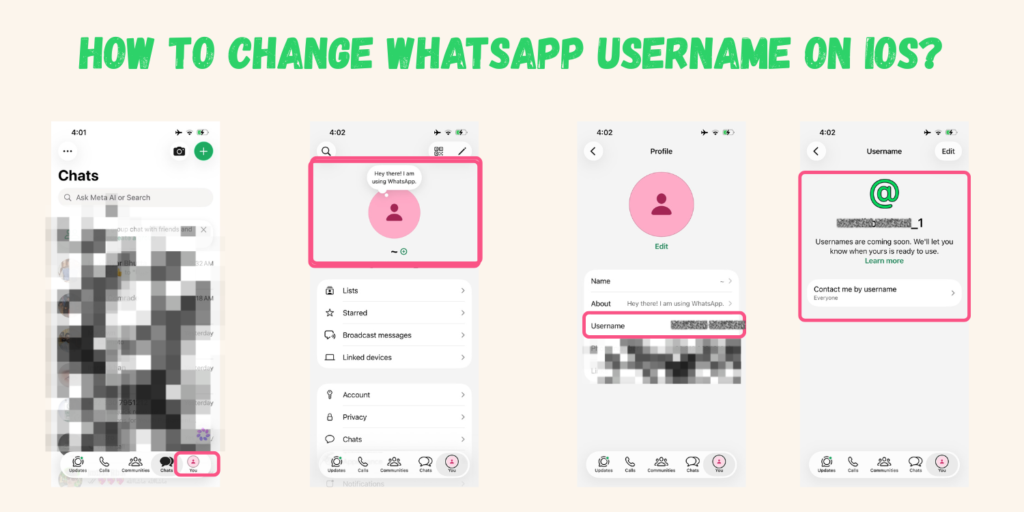
- Open WhatsApp and you will see the profile picture in the lower right corner, just click on the profile.
- Click on the profile picture again and it will take to you on the profile settings.
- You can see the username option at 3rd row, now click on the username and select your username.
- Reserve username before it will take someone.